Shopify metafields vs metaobjects
TL;DR
- Metafields add extra data to individual products, collections, customers, or orders.
- Metaobjects are reusable content types used across multiple products or pages.
- Use metafields for unique, per-product data.
- Use metaobjects for shared data to update it in more than one place.
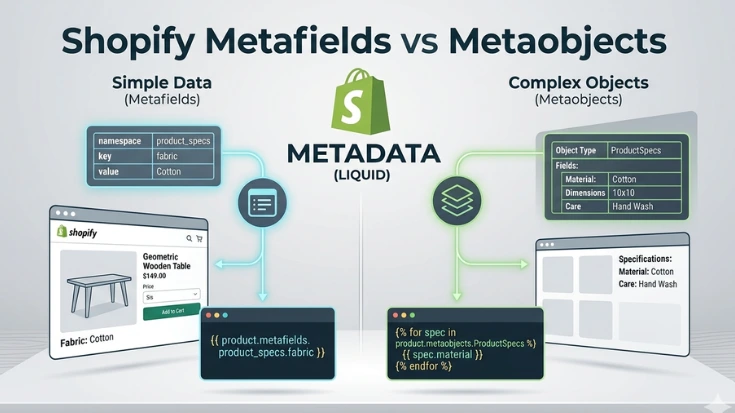
If you have been running a Shopify store for more than a year, you have almost certainly used metafields even if you did not call them that.
Any time you stored extra information against a product, a customer, or an order that Shopify’s default fields did not cover, that was a metafield.
When comparing Shopify metafields vs metaobjects, the distinction is often unclear.
They solve a related but different problem.
Understanding Shopify metafields vs metaobjects helps you choose the right structure before building anything.
Getting the distinction right before you build something saves a significant amount of time later.
The difference between Shopify metafields and metaobjects is not just technical.
It directly affects how easy your store is to manage, how scalable your product data is, and how much time you or your team spend updating content.
Getting this right early can save hours of repetitive work later.
Metafields: extra data attached to something that already exists
A metafield lives on a Shopify resource.
A product, a variant, a collection, a customer, an order.
It extends that resource with information Shopify does not store by default.
In practice, this looks like adding a set of metafields to every product in your catalogue and then surfacing them in your Liquid templates wherever they need to appear on the page.
A product description is an unstructured block of text.
A metafield is a named, typed piece of data.
That distinction matters: you can filter, sort, and display metafields independently.
You can show the processing method in one place and the altitude in another.
You can use them in search filters.
You cannot do any of that reliably with a description field.
Metafields are also more maintainable than tags for structured data.
Tags are flat and untyped.
If the data has a type and a purpose, it belongs in a metafield, not a tag.
When to use metafields
- You are adding extra information to something that already exists in Shopify like a product, a variant, a collection, a customer
- That information is specific to each individual record, different products have different values
- The data has a clear type, a number, a date, a piece of text, a file, a true/false value
- You want to display or use that data in your theme
Metaobjects: structured data that stands on its own
A metaobject is not attached to a product or a collection.
It is its own thing, a custom data type you define, with its own fields, that can exist independently in your store.
The clearest way to understand metaobjects is through an example where metafields would not work cleanly.
Imagine a store that sells skincare products.
Each product features one or more ingredients, and for each ingredient they want to show:
the ingredient name, a short description, a source region, and a small icon.
That ingredient information is the same across multiple products.
Vitamin C might appear in ten different serums, and the description of Vitamin C should be consistent across all of them.
With metafields, you would end up duplicating that ingredient data on every product that contains it.
Update the description of Vitamin C and you need to update it in ten places.
With a metaobject, you create a single Ingredient type, add one entry for Vitamin C, and reference it from every product that needs it.
Update it once, it updates everywhere.
Metafields extend something that already exists.
Metaobjects create something new.
A custom content type that your store owns and can reuse across multiple contexts.
When to use metaobjects
- The data you are managing is reused across multiple products, pages, or records
- The data is complex enough to have its own set of fields, not just a single value
- You are building something that behaves like a content type, ingredients, team members, FAQs, certifications, size guides
- You want merchants to manage this content through a clean admin interface, separate from individual products
Metafields vs metaobjects: Side by side
| Metafields | Metaobjects |
| Attached to an existing resource | Standalone with their own resource type |
| One value per product/collection/etc. | One entry reused across many products |
| Best for product-specific attributes | Best for shared content types |
| Simpler to set up | More setup, but more maintainable at scale |
| Good for: specs, tasting notes, sizing | Good for: ingredients, team, FAQs, certifications |
The question that decides it
Before you build anything, ask one question:
Is this data specific to one record, or is it shared across many?
- If the answer is specific, each product has its own unique value for this field. Use a metafield.
- If the answer is shared, the same piece of data appears on multiple products or pages. Use a metaobject.
A second question helps in ambiguous cases:
Would you want to update this in one place and have it reflect everywhere?
- If yes, that is a metaobject.
- If the value is always different per product, that is a metafield.
Getting it wrong is fixable, but painful.
Metafields used where metaobjects belong means updating the same data in dozens of places every time something changes.
Metaobjects used where metafields are sufficient means unnecessary complexity for a simple task. Neither mistake is fatal, but both cost time and the right decision at the start is significantly cheaper than a migration later.
Not sure which approach fits your store?
Choosing the wrong data architecture early in a Shopify build is one of the most common reasons a project becomes expensive to maintain.
If you are planning a build and want a second opinion before you start, the first call is free.